> For the complete documentation index, see [llms.txt](https://docs.optionalpha.com/llms.txt). Markdown versions of documentation pages are available by appending `.md` to page URLs; this page is available as [Markdown](https://docs.optionalpha.com/tools/bots/webhooks.md).
# Webhooks
Webhooks allow traders to link to external platforms and trigger automations using custom trading signals, technical indicators, email alerts, and more.
With Webhooks, we can now link our Option Alpha automations with the indicators and signals from some of the most popular charting platforms and applications. The addition of webhooks is a solution for traders in the community who want to use more indicators, custom signals, intraday timeframes, and email-based trade alerts.
Imagine triggering an automation to enter or exit a trade based on a custom indicator from TradingView or a trendline break on TrendSpider. With Webhooks, it’s now incredibly easy to set up these – or any other highly specific scenario you can dream up. Plus, it doesn’t just stop there, because you can also use external software services like Zapier, which enables you to convert signals received by email or any number of other sources into an outgoing Webhook headed straight to your bots.
### What is a Webhook?
A webhook makes it possible for two unconnected systems to communicate with each other. The webhook is the link between the platforms. For example, if something happens in 'System A' (such as a indicator-based trading signal) it can trigger something happening in 'System B' by calling the webhook (like running an automation in Option Alpha to open a position).
A Webhook allows you to trigger automations within Option Alpha from any external source you choose. This means we can now connect our Option Alpha account with other platforms like TradingView, Zapier, Python, and much more.
Trigger an automation to run inside Option Alpha from anywhere, for any reason; the possibilities are endless!
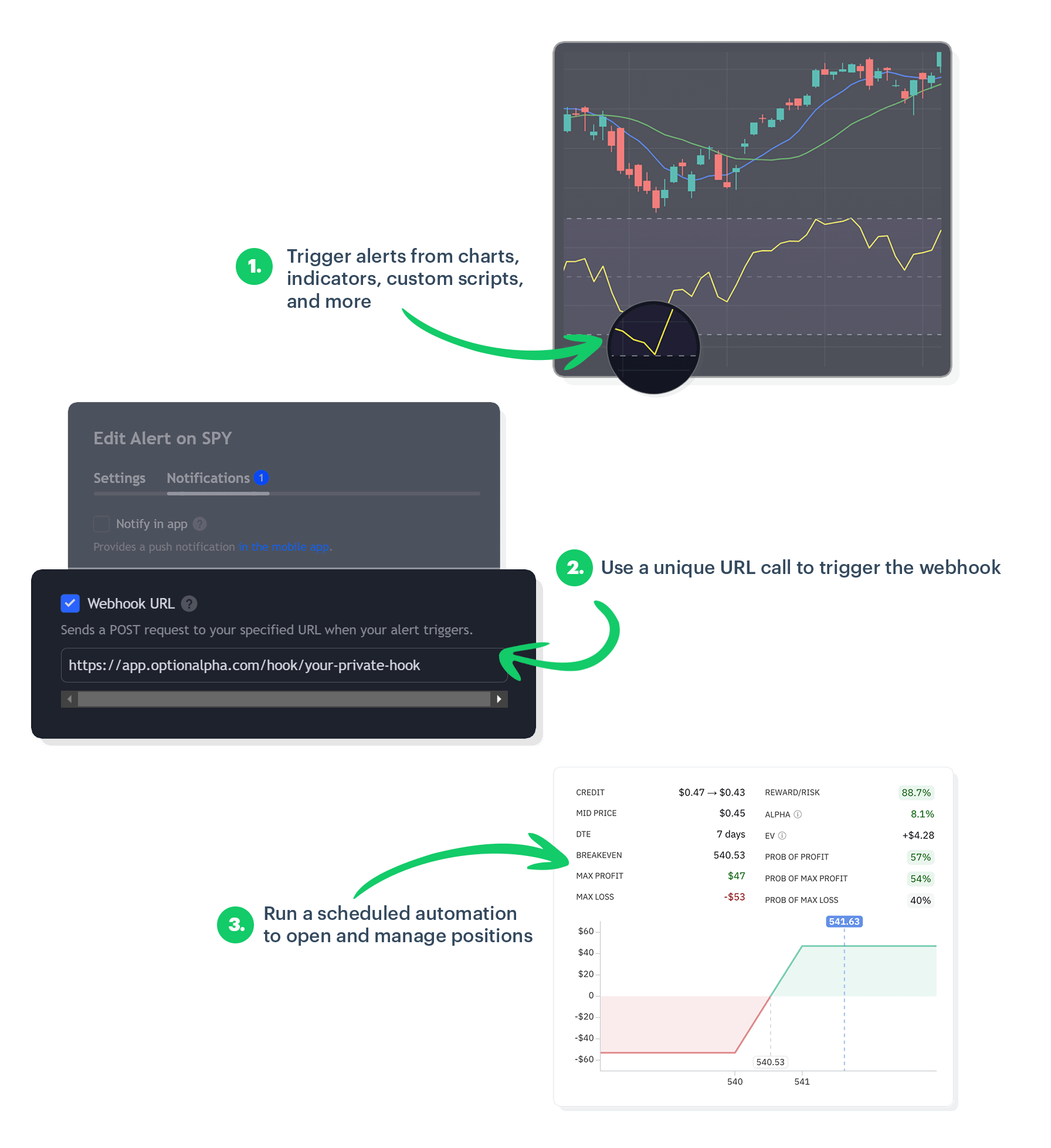
### Trigger automations using indicators and charts
There are many different ways we can use automations inside our bots. We can run them at continuous intervals, schedule them for a specific date and time, and now trigger them if a webhook is called from an external source, meaning an automation can run at any time based on a wide variety of alert signals.
One of the most exciting aspects of webhooks is the ability to use any indicator available on our favorite trading platforms. We’re no longer limited to the indicators within Option Alpha; we can now leverage the full suite of tools and analytics from other services to trigger trading signals and expand our opportunities. This, of course, includes any intra-day indicators from smaller timeframe charts.
{% hint style="info" %}
If you clone a bot that uses a Webhook automation trigger, the webhook will persist since it can be shared among bots.
{% endhint %}
### How to use Webhooks in Option Alpha
Getting started with Webhooks is simple and straightforward.
1. Create a new webhook URL in your Option Alpha account
2. Schedule an automation to run when the webhook triggers
3. Copy/paste the unique URL into an external platform
4. Define the criteria to call the webhook
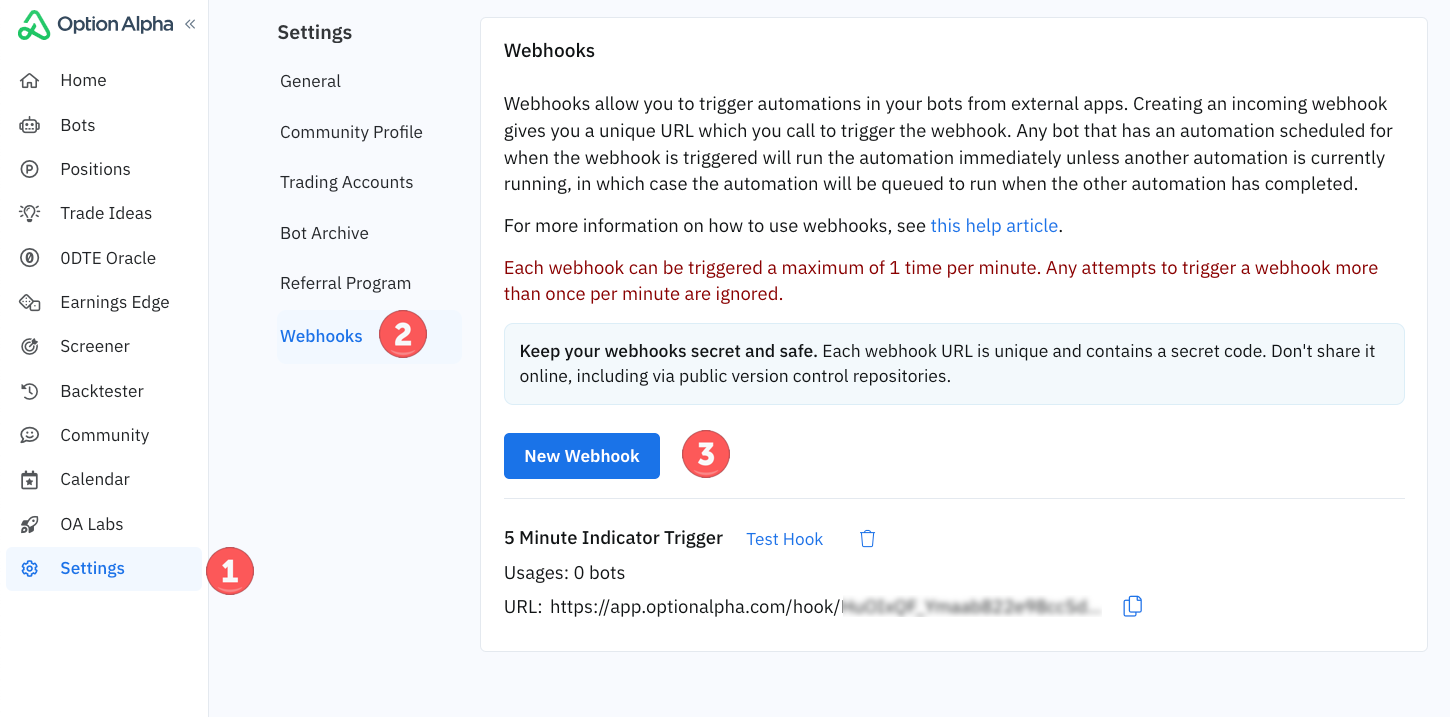
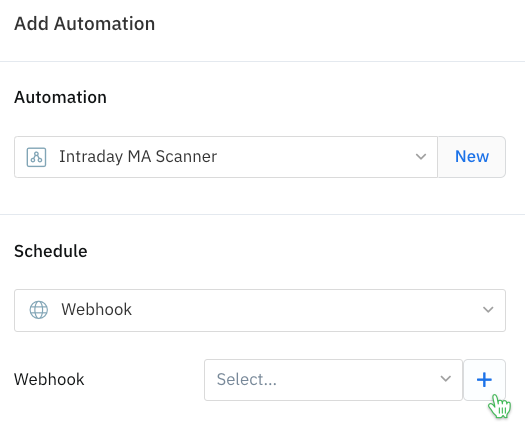
#### Create a new Webhook URL
Create and name your new webhook inside your Option Alpha Settings:
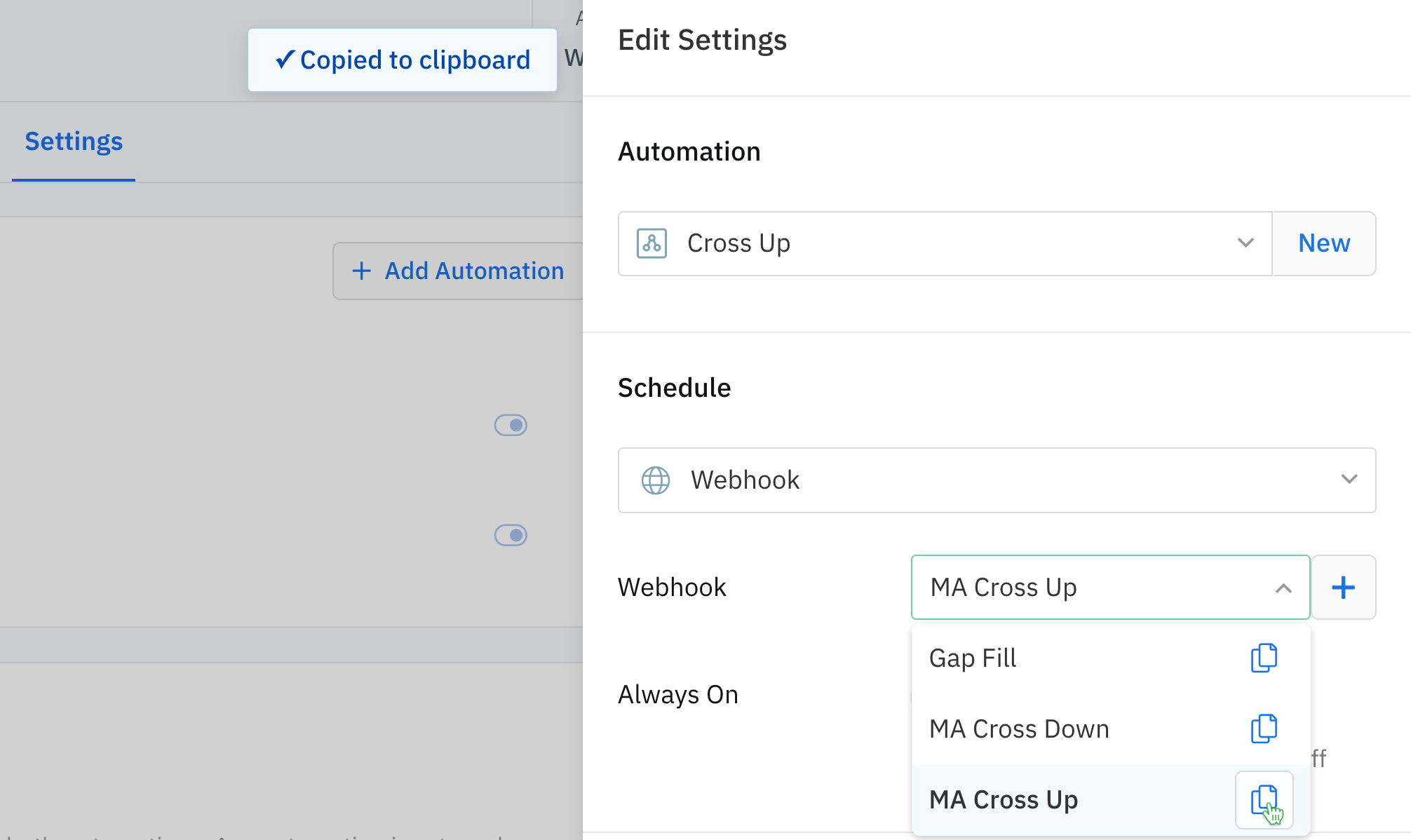
Or when creating a New Automation in a bot's Settings tab:
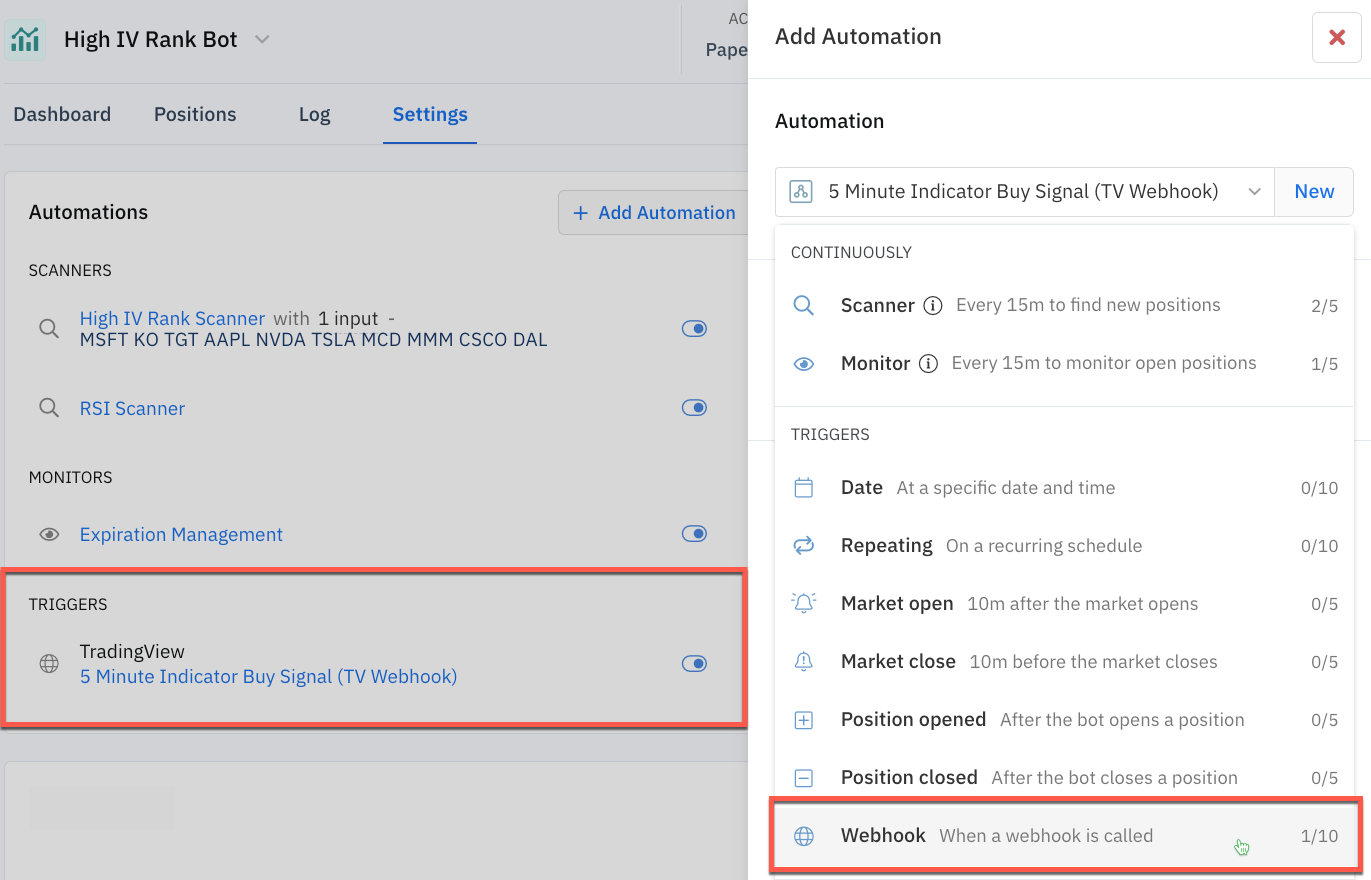
#### Schedule your automation trigger****
In your bot’s Settings, add the automation you want to run when your webhook is called, and select ‘Webhook’ from the available triggers. When your webhook is called, the automation will run instantly. A webhook can trigger up to 10 automations in a single bot, and a webhook can trigger automations in multiple bots.
Copy the webhook's unique URL code to paste into an external platform.
****Once your webhook is set up, you can sit back and let Option Alpha handle the execution of your trading strategy based on the real-time data from your connected sources.
Your automation can evaluate additional market criteria, position filters, opportunity checks, and more. Or, it can simply open a position. It can even run alongside other automations. You have full control to customize your webhooks and automations to accomplish your strategy goals.
#### Connect to an external source****
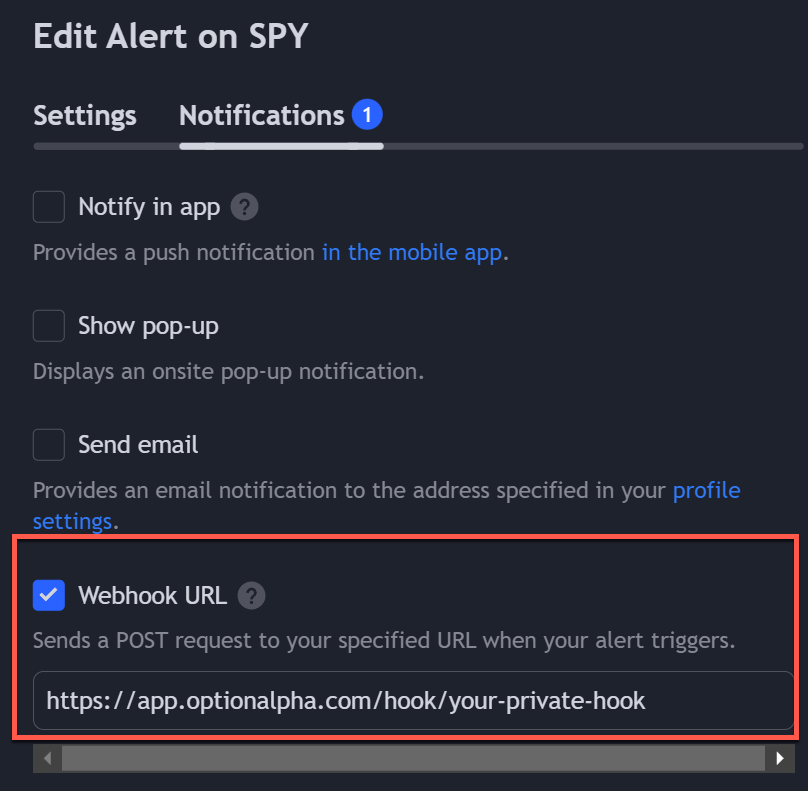
****Paste the custom URL to connect your Option Alpha account with the external platform of your choice. This may involve entering the URL into the webhook settings of TradingView, TrendSpider, or your email-based signal service.
Here is an example from TradingView…
Click on the Alert Button, then on the Notifications tab and paste your unique URL into the field:
#### Define your alert criteria
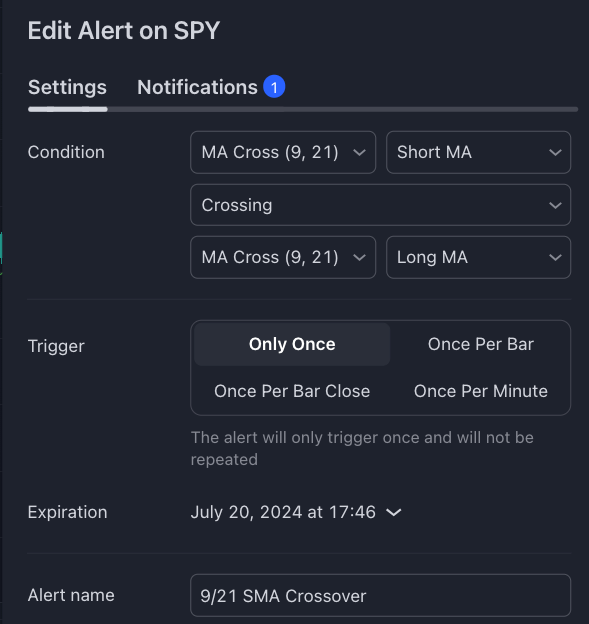
****Specify the conditions under which the Webhook should trigger an automation. This could be a particular indicator crossing a threshold, a specific chart pattern being recognized, or a trade signal email being received.
For example, this webhook would be called if SPY's 9-day SMA crossed above the 21-day SMA, trigger an automation of your choice in Option Alpha:
Here is a short, step-by-step guide to follow along with as you create a new webhook in Option Alpha and connect it to an a 3rd-party platform.
{% embed url="" %}
\*Option Alpha is not affiliated with TradingView, Zapier, or Python, and does not endorse any specific strategy, indicator, or alert. All examples are provided for demonstration purposes only.